Skip to content

Dispatches

VMware Validated Design for SDDC 4.0 Generally Available

Disclaimer

This content is provided for historical reference and may no longer reflect current guidance or best practices.

We're excited to announce that on March 2nd 2017 released the VMware Validated Design for Software-Defined Data Center 4.0. Another milestone in our commitment to delivering our customers standardized, proven, and robust data-center level designs for the Software-Defined Data Center.

The VMware Validated Designs provide our customers comprehensive, prescriptive guidance to plan, build, and operate a Software-Defined Data Center. The designs are extensively tested to ensure all components and their specific versions are validated to work in unison, to scale to predetermined design objectives, and operate as our customers expect.

Unlike reference architectures which may focus on an individual product or purpose without lifecycle management guidance, the VMware Validated Design for Software-Defined Data Center is a holistic approach to designing a full SSDC stack that’s applicable to a broad set of uses, with a commitment to ongoing upgrade guidance.

VMware Validated Design for SDDC 3.0 Generally Available

Disclaimer

This content is provided for historical reference and may no longer reflect current guidance or best practices.

In the last year since VMware announced the VMware Validated Designs at VMworld 2015, we've delivered on two iterations of the VMware Validated Design for SDDC. The first release, VMware Validated Design for SDDC 1.0, became available as a special offering through VMware Professional services in the spring of 2015. That was then followed by the first generally available release, VMware Validated Designs for SDDC 2.0, which was available in mid-Summer.

Today, we announce general availability of the VMware Validated Design for SDDC 3.0.

The engineering team has been doing a tremendous job incorporating feedback from early adopters to extend the applicability of the designs and add more elements and capabilities.

This generally available release includes all the features and capabilities of the existing prior 2.0 release along with some additional improvements and updates.

Let's take a look at some of the key improvements being incorporated into 3.0:

Announcing the VMware Validated Design for Software-Defined Data Center 2.0

Disclaimer

This content is provided for historical reference and may no longer reflect current guidance or best practices.

On behalf of the VMware Validated Design team, we are excited to announce the General Availability of the VMware Validated Design for Software-Defined Data Center 2.0.

What are the VMware Validated Designs?

A VMware Validated Design is a comprehensive set of documents that provide a prescriptive and extensively-tested blueprint to deploy and operate a Software-Defined Data Center (SDDC) using VMware’s technology. VMware Validated Designs synthesize the full SDDC software stack: compute, storage, networking, and management into standardized, streamlined and scalable designs, and provide detailed guidance for an optimal deployment and efficient on-going operations.

Each design is developed by experts, and rigorously tested and validated to ensure successful deployment and efficient on-going operations. Interoperability testing ensures that a validated design stays valid as subsequent versions of component products are released.

What is vCenter Server Watchdog?

Disclaimer

This content is provided for historical reference and may no longer reflect current guidance or best practices.

If you’ve done any research into the high-availability options available for vCenter Server 6.0, hopefully you have had a chance to read the VMware vCenter Server 6.0 Availability Guide written in collaboration with Technical Marketing and Global Support Services as well as KB 1024051. And you might have noticed particular sections that refer to the vCenter Server Watchdog. But what exactly is the vCenter Server Watchdog?

Enabled “out of the box” in 6.0, the vCenter Server Watchdog provides better availability by periodically verifying the status of vCenter Server.  It does this in two ways:

  • The PID Watchdog monitors the processes running on vCenter Server
  • The API Watchdog uses the vSphere API to monitor the functionality of vCenter Server.

If any services fail, the Watchdog attempts to restart them. If it cannot restart the service because of a host failure, vSphere HA restarts the virtual machine running the service on a new host.

That’s sounds slick, right? Well, let’s dive in and take a look at each of these watchdogs in detail.

Reconfiguring and Repointing Deployment Models in vCenter Server 6.0 Update 1

Disclaimer

This content is provided for historical reference and may no longer reflect current guidance or best practices.

In my last blog post, we discussed some of the new features and capabilities found in vCenter Server 6.0 such as how you can quickly and easily update the vCenter Server Appliance 6.0 to Update 1.

Now, it’s time to focus our attention on a two key enhancements found in vCenter Server 6.0 Update 1 - both the appliance and Windows-based form factors:

  • Reconfigure – You can now reconfigure an embedded deployment node to an external deployment model, also known as MxN.

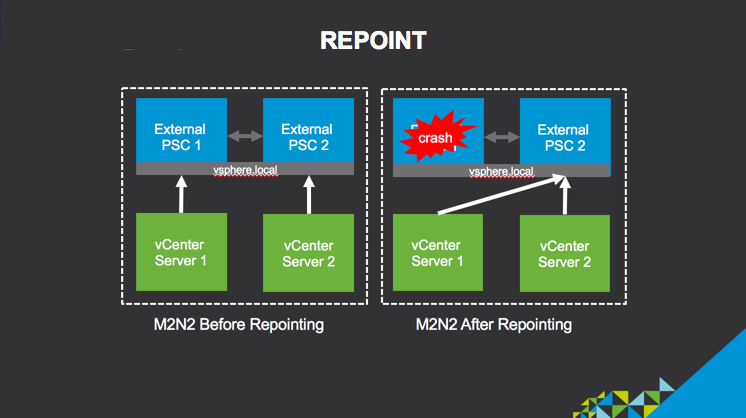
  • Repoint – Simplified repointing of a management node in an external deployment model from one external Platform Services Controller to another external Platform Services Controller.

Why is this important?

The reconfiguration enhancement enables you to take an existing embedded deployment and transition it to a more optimal external deployment model – MxN.  There is also the simplified ability to repoint a management node to another Platform Services Controller which enables you to quickly recover from an external Platform Services Controller failure and to distribute load to alternate nodes that are in the same SSO domain.

Before moving forward with either the reconfigure or repoint operations, there is a key set of requirements that you need to meet.