Skip to content

TechnologyΒΆ

A Deep Dive into golangci-lint

golangci-lint is one of the highest-leverage tools in the Go ecosystem because it turns a loose collection of static analysis tools into a single, fast, repeatable code-quality gate. Used well, it catches real bugs, reduces review noise, and helps maintainers keep a project consistent without turning style preferences into endless pull request commentary.

For many Go teams, the mistake is not adopting golangci-lint. The mistake is adopting it without a strategy. Enabling too many linters at once, tolerating unexplained //nolint comments, or treating the default output as a substitute for judgment quickly turns a useful signal into background noise.

This post walks through how golangci-lint works, how I think about configuring it for a real project, and how to run it in ways that are practical for both day-to-day development and long-term open source maintenance.

Much of what I know about golangci-lint was learned the unglamorous way: maintaining Go-based open source projects where lint output has to hold up in front of contributors, CI systems, release processes, and real users. That includes work across HashiCorp Terraform providers, HashiCorp Packer plugins, and Go SDKs.

If you want the broader project list behind that perspective, see the Open Source Projects section of my resume.

That context matters because this is not an abstract "here are the docs" walkthrough. It is an opinionated maintainer's view of what actually keeps linting useful in a long-lived Go codebase.

Automating Releases with GoReleaser

GoReleaser

Shipping a polished release for a software project by hand gets old fast: building for multiple platforms, packaging archives, generating checksums, publishing GitHub releases, cutting container images, and updating a Homebrew tap is exactly the kind of repetitive work that should not depend on memory or heroics.

GoReleaser turns that whole workflow into a repeatable release pipeline that scales from your first CLI to a heavily used open source project.

Not Just for Go-based Project Releases

Despite the name, GoReleaser supports releasing for Go, Python, Rust, Zig, and TypeScript based projects.

Manual releases often seem manageable at first, then turn into a mess the moment users ask for macOS support, ARM builds, checksums, containers, or a one-line brew install experience. Maintainers end up writing ad hoc shell scripts, copying files into GitHub Releases by hand, and hoping the version embedded in the binary matches the git tag they just pushed.

GoReleaser solves that by treating release engineering as configuration. You describe what to build, package, sign, and publish, then let one command, or one CI job, do the same thing every time. It handles the boring parts well enough that you get to focus on your project instead of your release checklist.

How to Create Terminal Demos as Code with VHS by Charm

VHS

Manual terminal recordings tend to age badly. The timing is inconsistent, the cursor jumps, the window size changes between takes, and the one command you needed to correct means starting over. If you have ever tried to capture a polished CLI walkthrough for a README, release note, or docs site, you have probably spent more time re-recording than documenting.

VHS from Charm (a.k.a., Charmbracelet) fixes that by turning terminal demos into source code. Instead of screen recording your desktop, you write a small .tape file that describes the terminal session: window size, theme, typing speed, commands, pauses, screenshots, and output format. Then VHS renders the result into a GIF, MP4, WebM, or even a directory of raw frames.

There are two hard parts in terminal documentation:

  1. Capturing a terminal session that looks clean and readable.
  2. Keeping that session reproducible as the tool, docs, and CLI output evolve.

Traditional recording tools help with the first part, but not the second. A hand-recorded GIF is an artifact, not a build input. Once it drifts from reality, you either live with stale docs or record it all over again.

VHS treats terminal demos the same way we treat infrastructure, tests, and CI workflows: as code.

Git Submodules Deep Dive for Platform Engineering

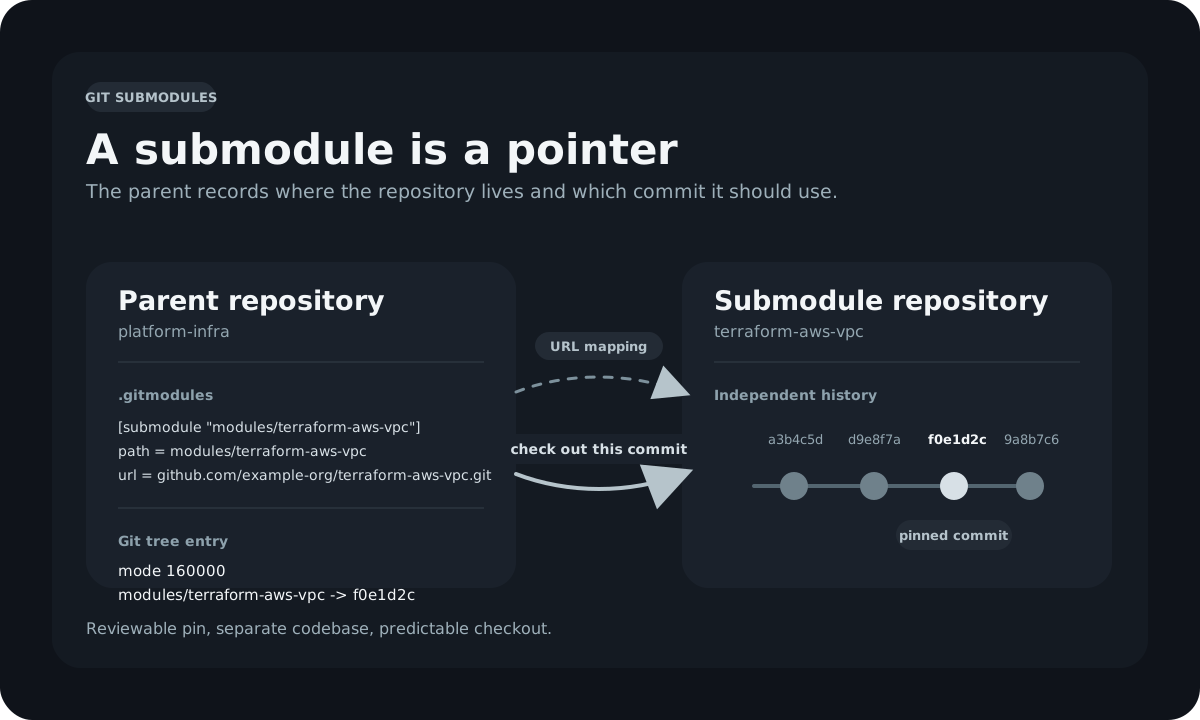
Platform engineering teams face a recurring challenge: shared code. You have a library of Terraform modules that ten product teams consume, a set of Ansible roles that every configuration management pipeline needs, or a collection of CI/CD workflow templates that must stay consistent across dozens of repositories. The naive solution is to copy files between repositories, but then every fix requires propagating changes to every consumer by hand. Git submodules offer a structured alternative: embed one Git repository inside another as a tracked dependency with an explicit, auditable version reference.

This post covers how submodules work at the Git level, how to add and consume them, the day-to-day operations that platform engineers and DevOps practitioners need to know, CI/CD automation with GitHub Actions, and the common pitfalls that cause teams to abandon submodules prematurely.

Git submodules mental model: the parent repository stores a gitlink commit pointer, not the submodule's files. Git submodules mental model: the parent repository stores a gitlink commit pointer, not the submodule's files.

Oh My Zsh on macOS: A Reference for a Clean, Maintainable Shell

% omz version
             __                                     __
      ____  / /_     ____ ___  __  __   ____  _____/ /_
     / __ \/ __ \   / __ `__ \/ / / /  /_  / / ___/ __ \
    / /_/ / / / /  / / / / / / /_/ /    / /_(__  ) / / /
    \____/_/ /_/  /_/ /_/ /_/\__, /    /___/____/_/ /_/
                            /____/

    master (061f773)

If you spend a large part of your day in a terminal, your shell stops being just a shell and starts becoming part of your development environment. On my Mac, that environment is built around Zsh, Oh My Zsh, the Spaceship prompt, and a small set of plugins that improve the things I do constantly: Git, GitHub, containers, Kubernetes, Terraform, Python, Go, and Ansible. The result is not flashy for the sake of being flashy. It is a shell that surfaces useful context quickly, stays out of the way when I am focused, and is still simple enough to maintain without turning ~/.zshrc into a junk drawer.